A standalone mod manager for Crimson Desert that applies byte-level patches to game files using JSON files as mods.
IMPORTANT
I tested it as much as I could but anyway be careful – best if you make backup of your 0.papgt yourself because anything can happen
If JSON mod manager is not working the fastest way to be sure is:
– Remove all numeric folders >0036(last original game folder is 0035) and Meta – don’t delete bin64
– Go to steam and verify game files
– Now try use JSON mod manager
Update 7.5
– Added support for Crimson Browser mods (Experimental)
– Fixed PAZ replacement – it’s experimental and be careful with that because it’s replacing entire file. Manager makes copy but as always in some cases could go wrong and you will end with verification
– Added Load order control
– Added compiled file merging – now there if there are multiple files targeting the same file manager extracts data from original file, compare it and merge into one – load order should work but it require more feedback
Update 7
– UI improvements:
– – added Start Game button
– – added folding categories to better JSON management
– – added search field – I found that it could be useful somehow
– Now clicking apply mods scans game directory, removes all old mods folders and reinstall clean with new IDs (I found that it was common issue for many and from my experience I had an issue when I tested it so I had 0036 with new JSON, and 0038 with old JSON and manager was applying both)
As always – best to backup your original 0.papgt manually, be careful.
Update 6
– Overall improvements
– MAJOR: Now you can mix json mods and precompiled ones (these ones with 0036 and meta) but make sure you will put it into one folder in example in mods folder you create MODNAME folder and there you put 0036 and meta
– Not-tested: It should now work with raw data if paths are correct – didn’t test it
Now instead pushing everything to 0036 manager now scans where OG game folders end and creates new ones so it should be better for future official DLCs, it will allow to solve conflict between many mods because now each mod have it own folder (jsons are compiled and put into one folder)
Update 4.1
– Improved Stability
– Added JSON detection – before it was only targeting 0008 folder, now it should detect which archive to patch
– Added experimental folder support with following structure:
mod_manager.exe — the mod manager (double-click to run)
mods/ — place .json and folder mod files here
Your_Mod_NameFolder/ — your mod build
0036/ — 0.pamt and 0.paz
meta/ — 0.papgt
enabled/ — mods moved here are active
backups/ — automatic backup of original 0.papgt
This mod folder support is highly experimental and could not work – didn’t have enough data to check it, reason behind it is future support for non-json mods
Crimson Desert — JSON Mod Manager
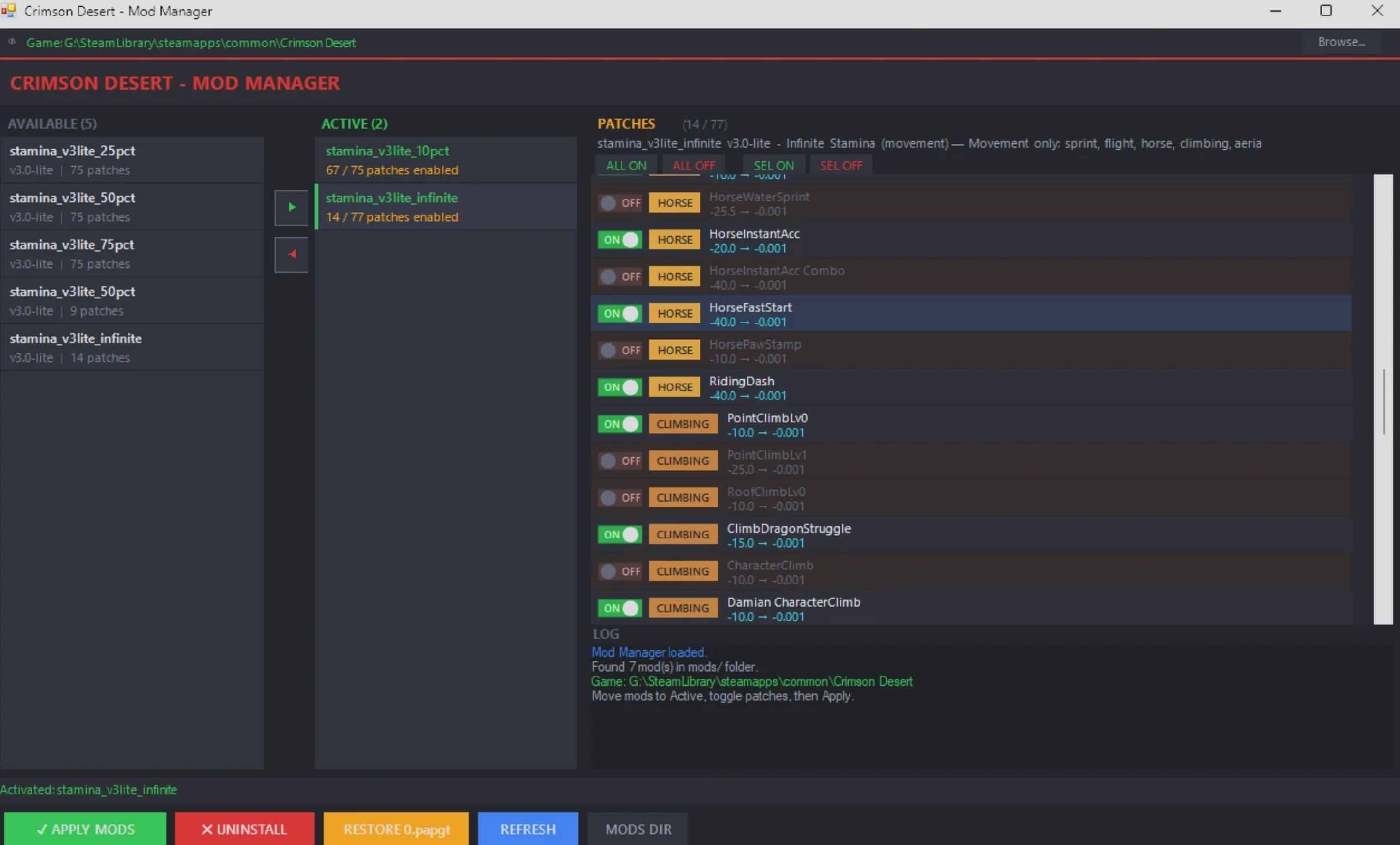
A standalone mod manager for Crimson Desert that applies byte-level patches to game files using a safe overlay system. No game files are permanently modified — all changes go into a separate overlay directory that the game loads on top of the originals.
Features
– Single EXE — just double-click mod_manager.exe, no Python or other dependencies required
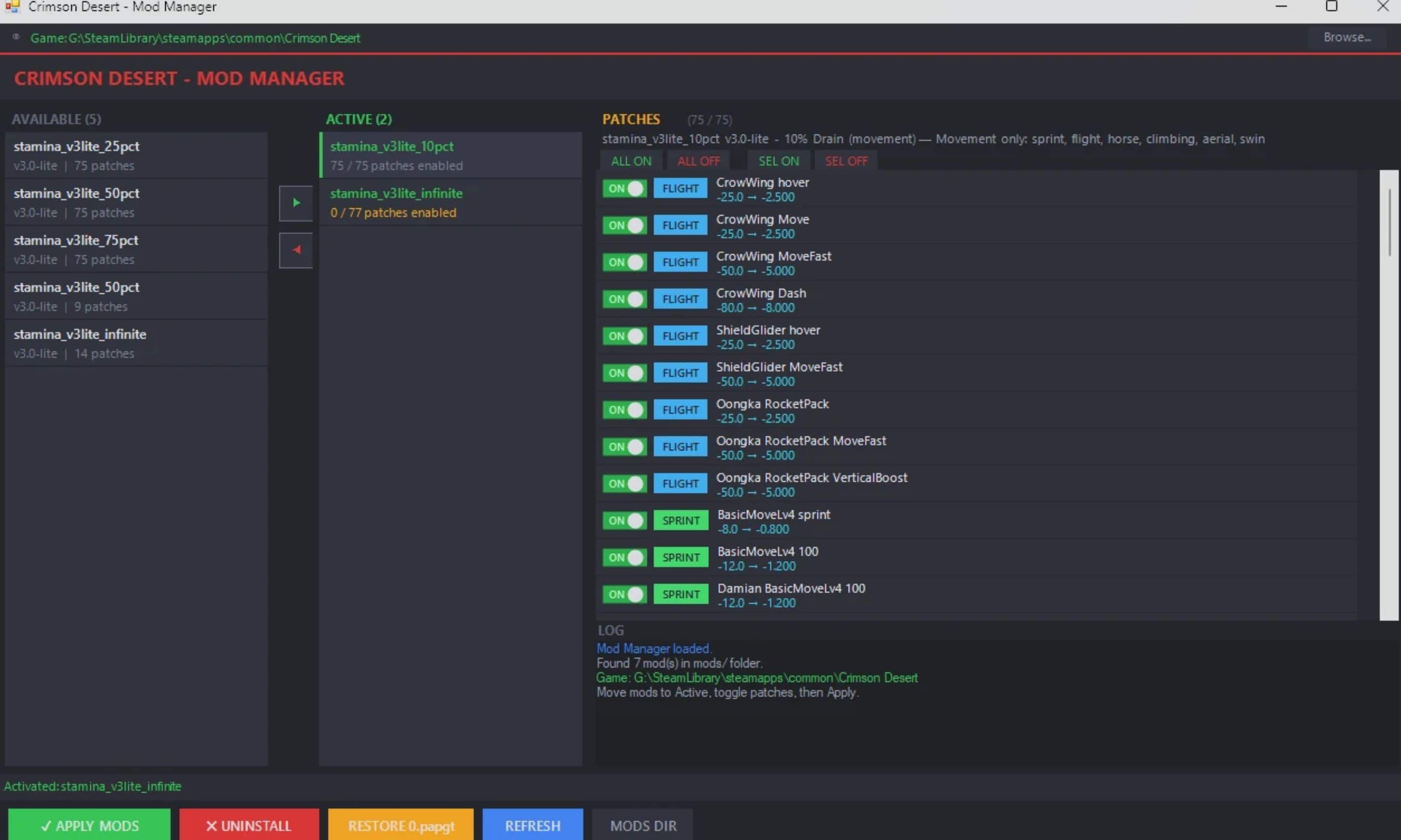
– Dark-themed 3-panel GUI: Available Mods → Active Mods → Per-Patch Toggles
– Per-patch control — enable or disable individual changes within a mod
– Color-coded categories
– Automatic Steam game directory detection
– One-click Apply / Uninstall
– Automatic backup of original 0.papgt before any changes
– One-click Restore from backup
– Safe overlay system — original game files are never touched
How It Works
The mod manager uses an overlay system. Instead of modifying the game’s original PAZ archives, it:
– Reads the original compressed game files from 0008/
– Decompresses them (LZ4), applies your chosen byte patches, and recompresses
– Writes the patched files into a new overlay directory (0036/)
– Registers the overlay in meta/0.papgt so the game loads patched files on top of originals
Uninstalling simply removes the overlay and restores the original 0.papgt from backup.
Installation
– Download and extract the archive anywhere on your PC
– Double-click mod_manager.exe
– The GUI will auto-detect your Crimson Desert install (Steam). If not found, click Browse to set it manually
– Select the mods you want from the left panel, activate them with the arrow button
– Toggle individual patches on/off in the right panel if desired
– Click APPLY
– Launch the game
Uninstalling Mods
Click UNINSTALL in the mod manager — this removes the overlay directory and restores your original 0.papgt. Your game is back to 100% vanilla.
Alternatively, click RESTORE to restore the backed-up 0.papgt directly.
Folder Structure
mod_manager.exe — the mod manager (double-click to run)
mods/ — place .json mod files here
enabled/ — mods moved here are active
backups/ — automatic backup of original 0.papgt
Requirements
– Crimson Desert (Steam)
– No Python, no .NET, no other dependencies — everything is bundled in the EXE
Compatibility
After a game update, byte offsets may shift. If the mod manager detects that original bytes don’t match at the expected offsets, it will skip those patches and report which ones failed. Mod JSONs will need to be updated for the new version.