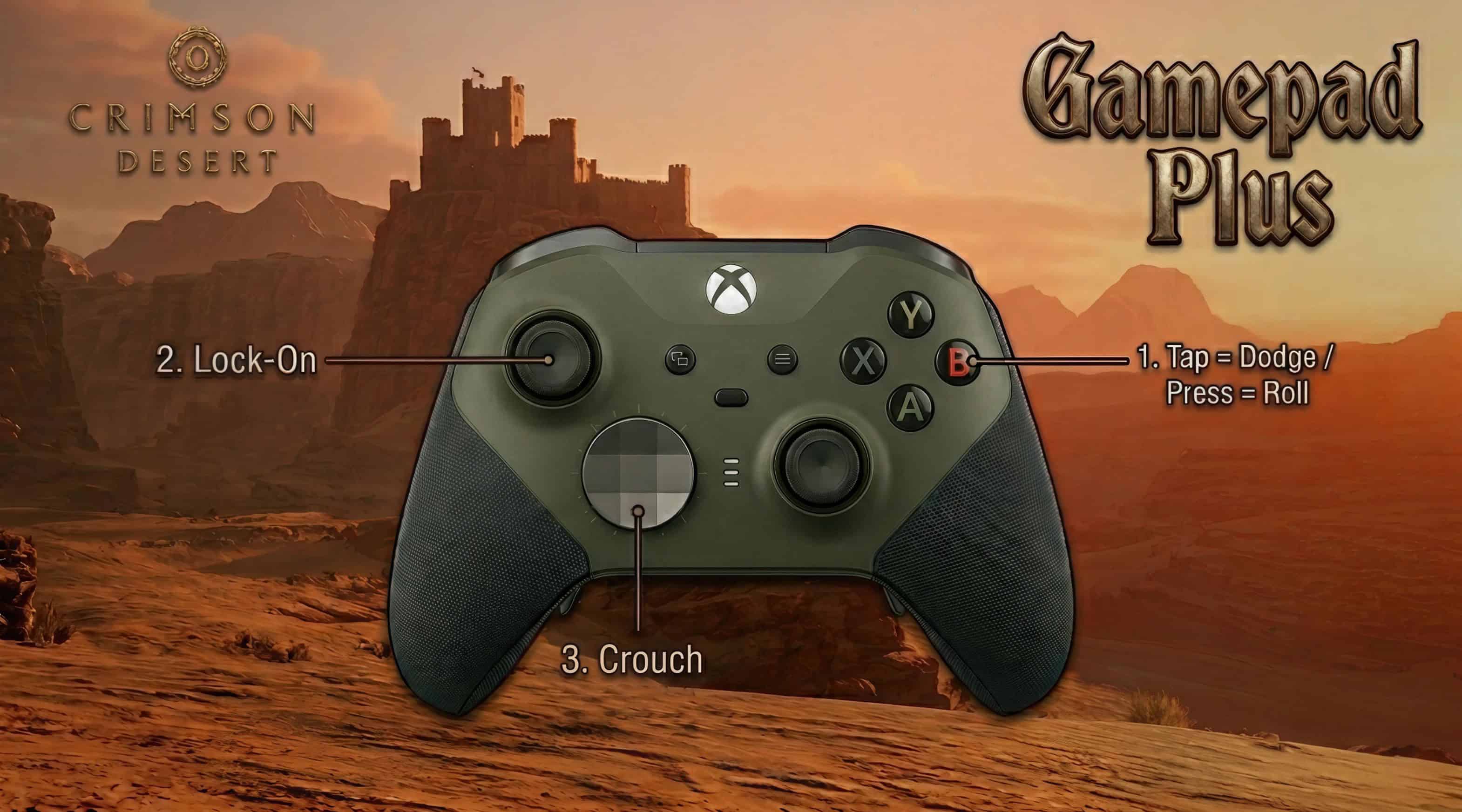
Dodge, Roll, Crouch, Lock-on. Dodge & Roll reworked. 4 Versions with Alts for A=Jump, X=Run. Fixes for default controls (Double Jump/Wings). Optional REWASD Elite Controller config included. After playing for 20+ hours I didn’t want to edit the controls too much, instead I edited only the controls that still bugged me.
Controls
– Lock-On = LeftStick (Applies on Release so as to not conflict with Axiom Grapple which is Hold LS)
– Crouch = Dpad Down (Slide is still Leftstick and also Dpad Down)
– Dodge – Tap B
– Roll = Hold/Long Press B
Dodge & Roll: I have added a quick releasetime and an IgnoreGrantTime tag so that the Roll fires off quickly.
This results in an improved situation where, on top of acting as tap=dodge/hold=roll, you can tap to dodge and during the dodge hold/long press (almost like a double click) and you will dodge then immediately roll.
You’d otherwise have to wait for the dodge animation to fully finish before initiating roll.
All versions include a fix for the default game of Wings/Glide sometimes activating during Double Jump
Versions:
– The Above (with A Jump / X Run option)
– The Above but Slide only on Dpad Down (with A Jump / X Run option)
– Dodge & Roll only (with A Jump / X Run option)
– A Jump / X Run Only
Optional: Rewasd Config for Elite Controller.
A/B/X/Y added to paddles. Left Upper + Lower paddles = Crouch/Slide. Right Upper+Lower = Health
Guide(Hold) = Map (Journal) Select+Menu (Hold) = Inventory (Skills)
Rewasd is paid (lifetime) software but you can get a 7day trial. I recommend it.
Crimson Mod Manager:
– Install Crimson Browser Mod Manager (new version no longer requires messing with python) – make sure to edit the config to point to your game install.
– Unzip and place “Gamepad Plus” version of choice in Crimson Browser “mods” folder
– Open Crimson Browser and allow it to build the cache (2 mins or thereabouts) – wait till it says “ready”
– Click “Mod Manager”, you will see “Gamepad Plus” on the left (make sure it’s active with an X in the box)
– Click “Build Active Mods” (click “yes”, when prompted)
– Click “Deploy in Game” (click “yes”, when prompted)
JSON Mod Manager:
– Install JSON Mod Manager
– Unzip and drag “Gamepad Plus” version of choice onto JMM
– Move mod from Available to Active
– Click “Apply Mods”
Updating Instructions
If the mod requires an update after an official patch:
Crimson Browser:
– Delete “bak” folder found in SteamLibrarysteamappscommonCrimson Desertmeta
– Delete the files found in Crimson Browser/crimson_cache
– Delete files found in Crimson Browser/mod_build
– Click “Remove Deployed Mods” in Crimson Browser
– Follow steps 3-6 above with updated mod.
If you get an ‘Unmatched Skipped’ warning (with any mod), make sure that you have done the above and allowed Crimson Browser to fully load the archive cache. Close down Crimson Browser and click Refresh Cache and try again.
If you get a ‘game needs reinstall’ error from Steam, delete the “meta” folder in SteamLibrarysteamappscommonCrimson Desert and validate game files via steam, then follow the above.
Limitations / Issues
– At the moment, with Slide still on LS, sliding during combat will also lock-on. Playstyle dependent really. Version 2 has Slide only on Dpad Down (works well with the Rewasd config if you have Rewasd)
– As of initial upload, I have played for around 40 hours, I’m on chapter 4 and have a bunch of skills unlocked. There may be issues I am unaware of right now. I will tweak as I go, if needed, and update the mod. If you run into issues, let me know.
– I tried to get Roll to be DoubleClick B (then perhaps I could get Crouch on Hold B) but failed after hours of trying. If I succeed, I will upload another version
– Obviously it is industry standard to have Lock-On on RightStick, but in Crimson Desert that ends up with having to alter combat and movement controls that I had gotten used to (spirit punch and spirit jump, plus given that LS+RS is the Spirit Recharge it makes sense to be on RS). If you must have Lock-On on RS, and don’t care about the above, try the controller mod linked below
Requirements
Crimson Browser Mod Manager