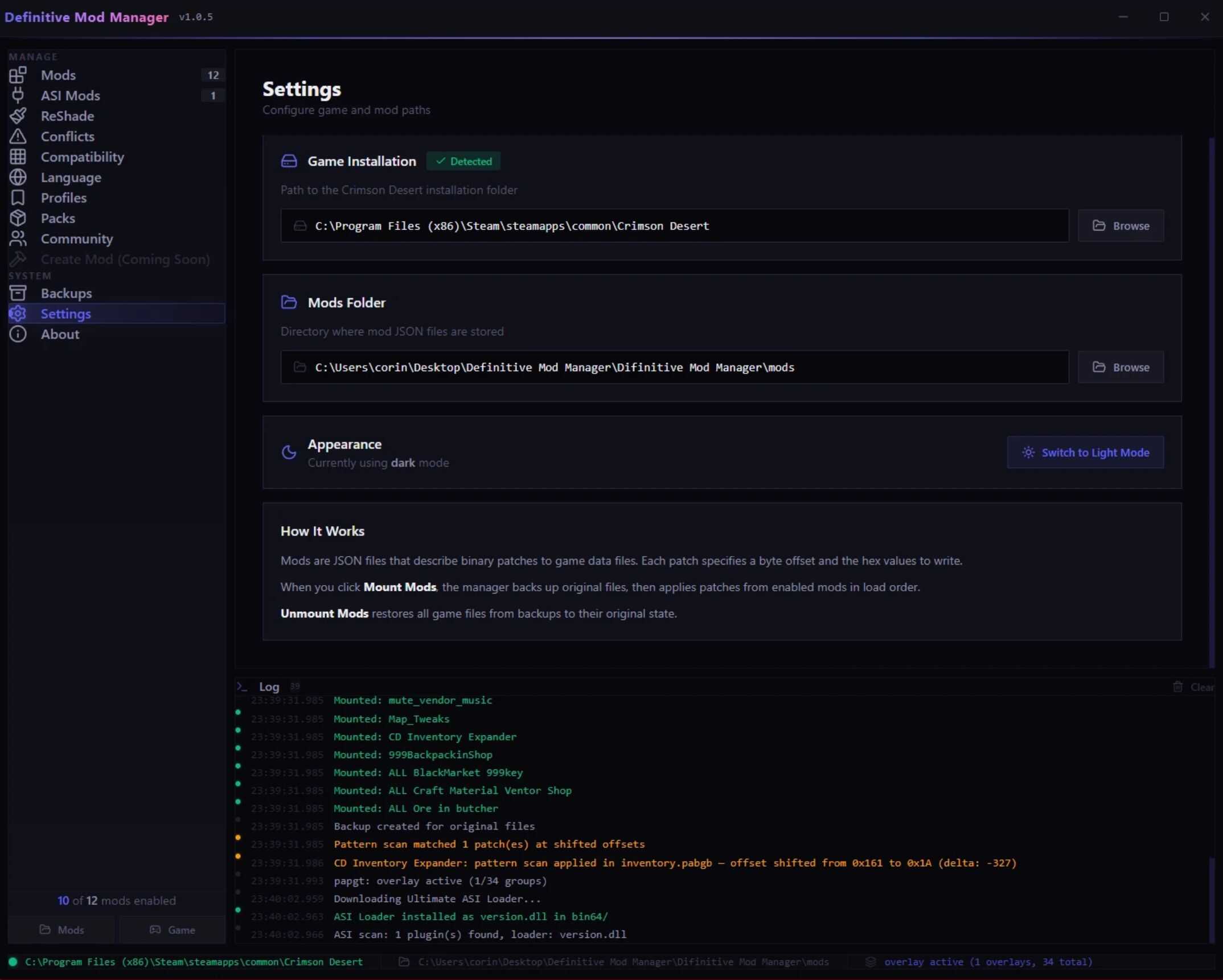
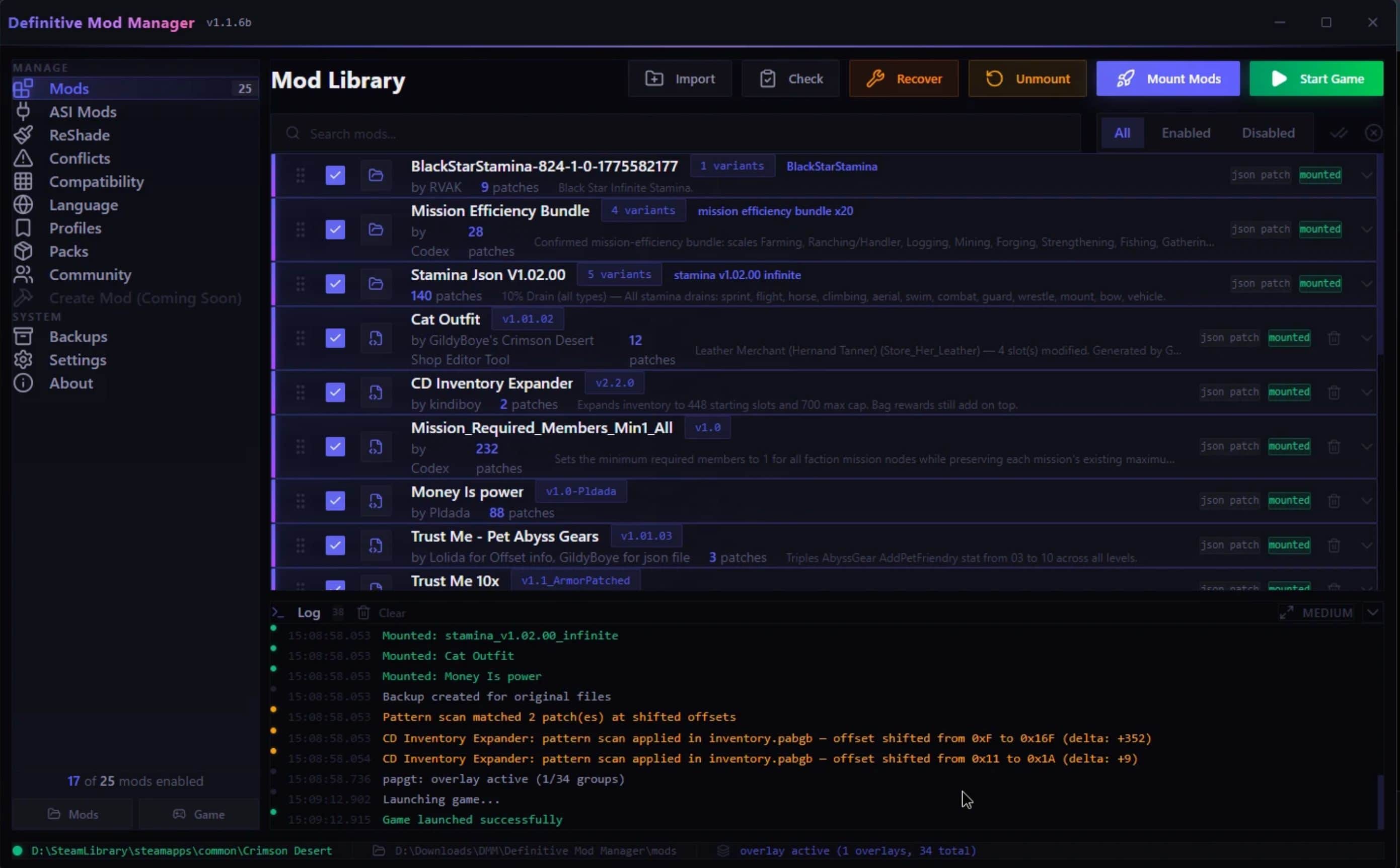
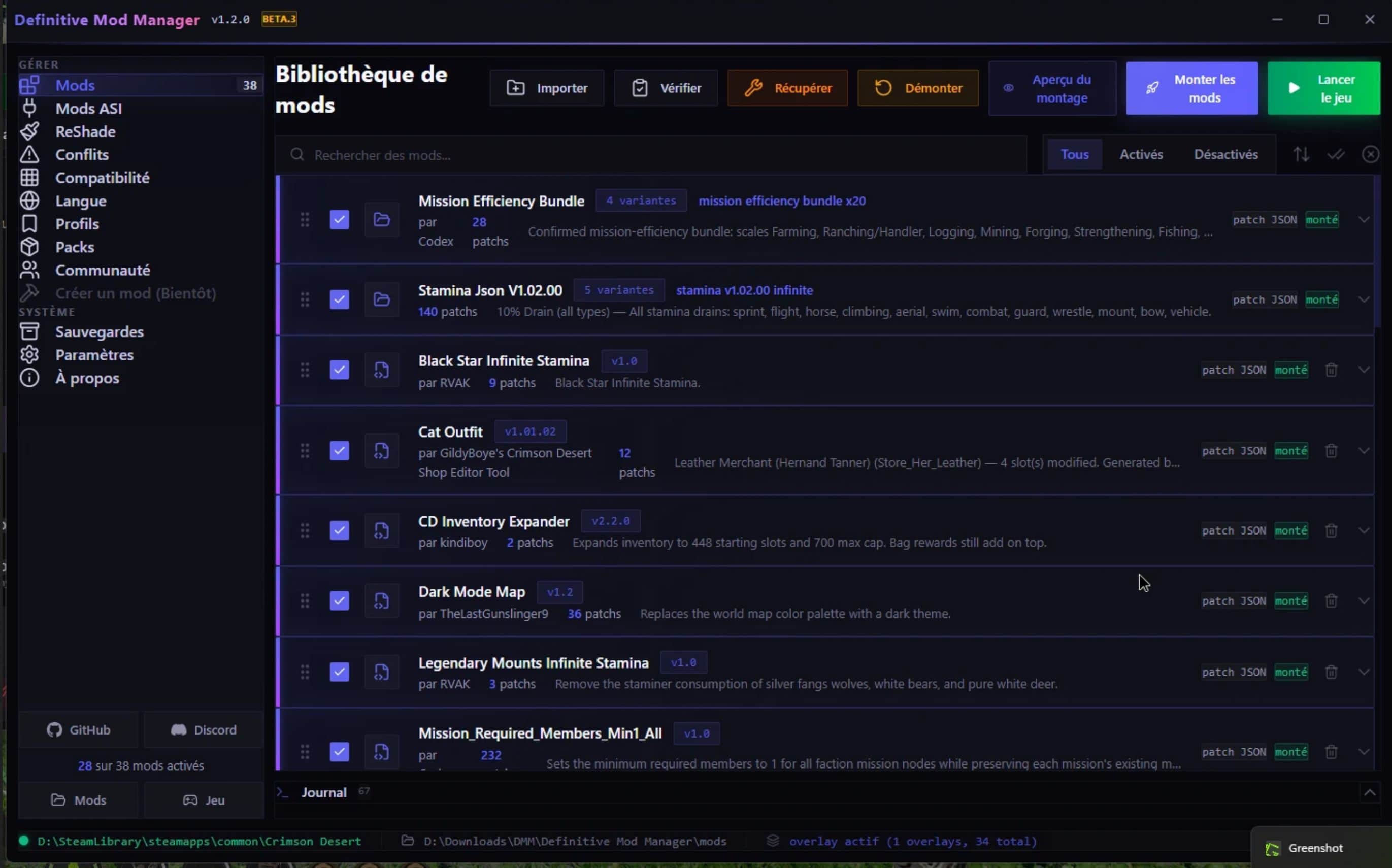
Mod manager for Crimson Desert. One-click mount/unmount with automatic backup. Supports JSON byte-patches, textures, file replacements, ASI/DLL plugins, and PAZ overlays. Pattern scanner auto-relocates patches after game updates. Nuclear unmount guarantees clean vanilla restore. Single exe, no dependencies.
Definitive Mod Manager (DMM) is a free, open-source mod manager for Crimson Desert. It handles every mod format in one application: JSON patches, textures, file replacements, UI mods, audio mods, ASI plugins, ReShade, and more. No other Crimson Desert mod tool supports this many formats in a single program.
If you are having issues downloading the update, you can find the official version & beta release in my GitHub repo listed above. Shoutout to, julien973, Khameli0n, and LemanRuss40000 for your invaluable feedback and contributions to DMM. Special thanks to PhorgeForge! The new XML patching engine in this release was contributed by Phorge, author of JSON Mod Manager.
How to Install Mods for Crimson Desert
– Download the Definitive Mod Manager exe from the Files tab
– Place it in its own folder (not inside the Crimson Desert game directory)
– Run it. DMM auto-detects your Crimson Desert installation on Steam, Epic, or Xbox
– Drop your Crimson Desert mods into the mods folder, enable them, and click Mount
How to Use: Crimson Desert Mod Compatibility Guide
Important: Read this before reporting a Crimson Desert mod as broken.
Definitive Mod Manager attempts to support every mod format currently available for Crimson Desert modding. However, mods that contain multiple files or folders must be placed inside a single named folder in your mods directory for DMM to detect them.
What does NOT need a folder:
– JSON byte-patch mods: Single .json Crimson Desert mod files go directly into the mods/ folder. Example: mods/Money Is Power.json
– ASI / DLL plugins: Single .asi or .dll files go into mods/_asi/ or drag onto the window
What DOES need a folder:
– File replacement mods: If a Crimson Desert mod extracts to folders like 0036/, meta/, files/, or numbered directories, all of those must be inside one parent folder
– Standalone overlay mods: Mods with 0036/0.paz + 0036/0.pamt need a wrapper folder
– Texture mods: Folders containing .dds texture files for Crimson Desert
– Any mod with multiple top-level items after extracting
Example: Shoulder Camera Mod
This Crimson Desert mod extracts to two separate folders at root level:
0036/
0.paz
0.pamt
meta/
0.papgt
Wrong. Extracting directly into mods/:
mods/
0036/ <– DMM cannot identify what mod this belongs to
meta/
Correct. Place inside a named folder:
mods/
Shoulder Camera Mod/
0036/
0.paz
0.pamt
meta/
0.papgt
Quick rule: If a mod extracts to more than one file or folder, create a folder, name it after the mod, and put everything inside it. The Crimson Desert mod manager will detect it automatically.
Note: When importing via drag-and-drop (.zip / .7z / .rar), DMM auto-wraps loose files into a folder for you. This only applies if you manually extract and copy Crimson Desert mods yourself.
What’s New in v1.2.0 (Official)
The 1.2.0 official release is out of beta. Two new compatibility breakthroughs land alongside everything from the full 1.2.0 beta cycle.
Headline Features
– Path-Routed Smart-Merge: Older third-party mods often declare a target group based on the game version they were authored against. After Crimson Desert reshuffles which files live in which numbered group between game updates, those mods point at the wrong group. The old wholesale-replace path nuked hundreds of unrelated vanilla files. The canonical case: a mod targeting 0001/ for iteminfo.pabgb wiped 9582 vanilla tree assets because group 0001 is now tree data, not iteminfo. DMM now reads the mod’s PAMT, looks up where each file actually lives in your current vanilla via path lookup, and surgically appends and redirects only the matching record. Wrong-group mods route to the correct group automatically and never crash the game.
– Iteminfo Multi-Mod Merge Engine: Most item mods ship a fully-modified iteminfo.pabgb (6019 records) with their changes layered on top of an older vanilla baseline. Mounting two of them used to mean the second one wiped out the first’s edits. DMM now parses each enabled iteminfo mod into structured records (full byte-roundtrip preservation across all 6019 entries), diffs each one against your current vanilla to identify what records that mod actually changed, then merges every mod’s changes into a single combined iteminfo. Disjoint changes coexist; same-record conflicts resolve to the later-mounted mod. Triggers automatically when 2 or more iteminfo mods are enabled. Verified by integration tests against real mod data.
– Save Engine in Settings: Verify any save decrypts and HMAC-checks cleanly, back up and restore whole save slots, manage timestamped save backups. Backed by DMM’s own ChaCha20-IETF + HMAC-SHA256 + LZ4-block engine. 13 unit tests cover header parsing, key derivation, round-trip, and tamper detection. Verified against real saves.
Also in v1.2.0
– Dual-Group Overlay: Standalone mods write to group 0036 with byte-for-byte preservation of the original PAZ/PAMT, and DMM-generated overlay content writes to group 0037. Fixes mods like Skip Character Walking where subtle PAMT rebuild differences broke runtime behavior. When a single standalone mod is active, the game sees its exact original bytes.
– PAPGT Integrity Fix: DMM now ignores mod-supplied meta/0.papgt files and always rebuilds CRCs from the vanilla backup. Fixes “need to reinstall game” errors from older mod packs that bundled stale PAPGT files.
– Semantic Field-Level Merge: When two mods change different fields of the same .pabgb record, both changes are preserved instead of one overwriting the other.
– DDS Pipeline Rework: DDS processing now branches by mip count instead of DX10 flag. Correctly handles BC7 / DXT1 / DXT5 textures with any mip configuration. Fixes CTDs from character texture mods with non-standard mip layouts.
– Root-Directory Overlay Lookup: Fixed hashlittle for empty input (now correctly returns 0xDEBA1DCD). Mods placing files like paconfig.txt at the game root now mount correctly. Previously these silently failed because the hash of the empty-string path was computed wrong.
– Steam Language Auto-Detection: DMM reads appmanifest_3321460.acf to determine your locale, then auto-redirects Korean-targeting language mods to your actual group (0019 to 0020 for English, etc.) with in-place PAMT filename suffix rewrite (_kor.paloc to _eng.paloc).
– Large Mod Set Performance: vanilla_flags_cache built once per mount instead of a per-file lookup. Eliminates the multi-minute “resolving file conflicts” hang on large mod lists. Dedup now completes in seconds even with 100+ active mods.
– Patch Collision Detection: New preset_group schema for mutually-exclusive patches within a single mod, backed by a GUI picker at mount time. “First only” and “Keep all” quick buttons for fast resolution.
– Conflict Override Flag: Mods can declare conflict_override: true to win byte-level inter-mod conflicts regardless of load order. Badge shown on the mod card.
– Mod Update Detection: SHA256 hash tracking detects when Crimson Desert mod files change between sessions. Shows “Updated” and “New” badges.
– Mount Lock Recovery: PID liveness check auto-clears stale lock files left behind by killed DMM processes. No more “DMM is already running” errors after a crash.
– DDS Path Resolution: Strips numeric prefixes from mod paths (e.g. 0009/32/character/) and resolves canonical directory via PAMT lookup. Per-extension and top-dir inference as fallback.
– XML Encryption Fallback: XML mods get encryption fallback when vanilla flags return 0. Fixes XML-only mods (like Barber Unlocked) being silently ignored when the vanilla target wasn’t in the archive index.
– PABGH 6-Byte Entry Support: Parser now handles regioninfo.pabgh with u16 key + u32 offset format. Fixes Region Dismount Removal by LemanRuss40000.
– Scanner Improvements: Falls back to mod.json (with modinfo wrapper) and manifest.json. Added sequencer to the recognized top-level game directories. More mod folder layouts detected automatically.
– ASI / DLL Security Scanner: Every plugin is scanned for digital signature, Shannon entropy, suspicious Windows API imports (keylogger / RAT patterns), TLS callbacks, writable+executable sections, missing version info, and appended file overlays. Results surface as a color-coded badge with a click-to-expand details panel. Purely informative. Activation is never gated.
– In-App Mod Editor: Monaco-powered code editor built into DMM lets you inspect and edit mod files without leaving the app. Switches to read-only automatically when mods are mounted.
– Game State Verification: Full integrity scanner for Crimson Desert game files: PAPGT/PAMT CRC validation, overlay consistency, backup state, version match, orphan detection.
– Vanillafy: One-click recovery button that auto-repairs corrupted Crimson Desert game state, cleans orphaned files, and restores vanilla backups.
– Game-Modified-State Banner: On startup, a dismissible warning surfaces when DMM detects the game has been modified outside of it (overlay directories from another tool, leftover .bak files, unknown ASI loader).
– Persistent Activity Log: Mod manager logs survive across sessions with session separators. Capped at 2,000 entries.
– Mount History: Records every mount session with duration, mod list, and error count.
– Mount Preview Dialog: Pre-mount confirmation shows categorized entries (byte patches, file replacements, textures, encrypted files) before you commit.
– Paired Insert/Replace: Mods with interleaved insert+replace operations apply changes in order with cumulative offset tracking. Handles 200+ changes correctly.
– Signature-Based Patching: Mods with byte signatures find the correct record location regardless of game update offset shifts.
– Record-Relative Patching: Mods using named record entries with relative offsets resolve automatically via pabgh index lookup.
– JSON Auto-Repair: Mods with broken manifest JSON (missing commas, trailing commas) are auto-fixed on import and mount.
– Format 2 JSON Support: Full support for hex string offsets, insert operations, replace-with-bytes, and record-relative changes.
– Smart Encryption: File replacement mods use the original file’s PAMT flags to determine encryption instead of guessing by extension.
– Audio Soundbank Injection: .bnk files inject into vanilla PAZ groups with correct 0x0000 flags. Fixes voice-mod replacement (Wwise compatibility).
– RAR Import: Import .rar mod archives alongside .zip and .7z (requires 7-Zip installed).
– Mount Log: Every mount writes a detailed mount_log.txt with full pipeline trace (dual-group diagnostics, dedup cache stats, CRC updates, language remaps, path-routed merge events, iteminfo merge contributions).
– Game Maintenance: Verify Crimson Desert game files through Steam and refresh vanilla backups directly from Settings.
– Auto-Sort on Enable: Enabled mods automatically sort to the top of the list for easier organization.
– Category-Grouped Patch UI: Patches with [Category] label prefixes render as collapsible sections. Search field filters in real time for mods with 6+ patches.
– UI Improvements: Uniform mod card sizing, 2-line max cards, larger text, GitHub and Discord buttons in sidebar.
– 14 Languages Updated: All features translated across all supported languages.
Crimson Desert Mod Manager: Core Features
– One-Click Mount / Unmount: Apply all enabled Crimson Desert mods with a single click. Unmount restores your game to exact vanilla state.
– Path-Routed Smart-Merge: Mods that target the wrong PAZ group (because they were authored for an older game version) automatically re-route to the correct group based on actual file paths in your current vanilla. Wrong-group mods can no longer crash your game.
– Iteminfo Multi-Mod Merge: Multiple item mods coexist instead of overwriting each other. Each mod’s changes are diffed against vanilla and merged into one combined iteminfo at mount time.
– Dual-Group Overlay Architecture: Standalone mods ship pristine to group 0036. DMM-generated content goes to 0037. Preserves exact original bytes when a single standalone mod is active.
– Pattern Scan Engine: When Crimson Desert game updates shift byte offsets, DMM automatically finds and patches at the new location. Mods survive game updates without needing author updates. The only Crimson Desert mod manager to do this, until another vibe coder like myself downloads my source code of course.
– Nuclear Unmount: Compares your Crimson Desert game directory against a vanilla manifest and removes every non-vanilla file. Guarantees a clean restore every time.
– Game Update Detection: Detects when Crimson Desert updates and automatically refreshes backups and caches. No more broken CRC mismatches.
– Automatic Backup System: Creates vanilla backups on first run. Manual backup button, individual restore, or bulk restore from the Backup Manager.
– Save Engine: Verify, back up, and restore Crimson Desert save slots from Settings. Full ChaCha20-IETF + HMAC-SHA256 + LZ4 round-trip, tested against real saves.
– Mod Profiles: Save and load named Crimson Desert mod configurations for instant switching between setups.
– Conflict Detection: Warns when multiple Crimson Desert mods patch the same offset or replace the same file. Works across all mod types.
– Intra-Mod Collision Resolver: GUI picker for mutually-exclusive patches within a single mod, backed by the preset_group schema.
– Compatibility Matrix: Visual grid showing pairwise compatibility between all installed Crimson Desert mods.
– Pre-flight Checks: Validates Crimson Desert game files, offsets, and conflicts before mounting.
– Interrupted Mount Recovery: Detects and recovers from interrupted mount operations automatically. Stale lock files from killed processes are auto-cleared via PID liveness check.
– Drag & Drop Import: Drag .json, .zip, .7z, .rar, .asi, .dll files or mod folders onto the window to install instantly.
– Auto Game Detection: Automatically finds your Crimson Desert installation across all drives. Supports Steam, Epic Games, and Xbox.
– Launch Game: Start Crimson Desert directly from the mod manager. Platform-aware launcher so DLSS/FSR/XeSS upscalers remain available.
– In-App Mod Editor: Monaco-based code editor for inspecting and editing mod files from inside DMM. Read-only while mounted for safety.
– Activity Log: Persistent, color-coded log with session history across restarts.
Supported Crimson Desert Mod Formats
– JSON Byte-Patch (.json): Format 1 and Format 2 hex patches for Crimson Desert .pabgb game data with pattern scan fallback, insert operations, signature matching, and record-relative offsets.
– File Replacement (manifest.json / mod.json + files/): Full Crimson Desert file overrides organized by PAZ group.
– Loose Folder: Numbered group directories (0000-0037) auto-detected without any manifest.
– PAZ Replacement: Pre-built Crimson Desert .paz archives at any index (0.paz, 1.paz, 32.paz, etc.). Path-routed smart-merge handles wrong-group claims automatically.
– Standalone Overlay: Mods with pre-built 0036/0.paz + 0036/0.pamt auto-detected and mounted with byte-for-byte preservation.
– Iteminfo Mods: Modified iteminfo.pabgb files. Multiple iteminfo mods merge automatically at mount time so each mod’s changes coexist.
– DDS Textures: DX10/BC7, DXT1, and DXT5 Crimson Desert texture replacements with full PATHC metadata support and mip-count-aware processing.
– Font Mods (.ttf / .otf): Per-language Crimson Desert font replacement via PAZ overlay with LZ4 compression.
– Audio Mods (.wem / .bnk): Crimson Desert Wwise audio file and soundbank replacement through the overlay pipeline.
– UI Mods (.css / .xml / .html): Crimson Desert interface modifications with ChaCha20 encryption, XML auto-fix, and encryption fallback for new files.
– ASI / DLL Plugins: Native code mods with ASI Loader auto-install, drag-and-drop, and auto-pickup from mods folder.
– ReShade Presets: Crimson Desert post-processing shader management with preset switching.
– Script Mods (.bat / .ps1): Detected and flagged for manual execution.
Crimson Desert Mod Load Order & Management
– Unified Load Order: All Crimson Desert mod types in one drag-and-drop list with shared ordering
– Per-Patch Toggles: Enable or disable individual patches within a Crimson Desert mod
– Preset Picker: Mods with bracket-labeled variants like [50], [100], [150] show radio buttons
– Preset Group Resolver: Mods that declare mutually-exclusive patches via preset_group trigger a GUI picker at mount time
– Merged Cards: Texture and file mods from the same folder display as a single card
– Multi-File Patching: Supports Crimson Desert mods targeting any .pabgb game file
– Cross-Format Merge: JSON byte patches applied on top of file replacement bases automatically
– Iteminfo Auto-Merge: Two or more enabled iteminfo mods automatically merge at mount time. Disjoint changes coexist; same-record conflicts resolve to the later-mounted mod
– Smart Conflict Resolution: Per-file override picker and load order recommendations for conflicting Crimson Desert mods
Safety & Recovery for Crimson Desert Modding
– Clean Patching: Always patches Crimson Desert files from clean vanilla, never stacks on top of previous mounts
– PAPGT Validation: Detects tainted Crimson Desert game files from other tools with one-click Restore Vanilla. Mod-supplied PAPGT files are ignored and CRCs are always rebuilt from the vanilla backup.
– Game State Verification: Full CRC integrity scan of Crimson Desert files with one-click Fix Everything recovery
– Save File Tools: Verify, back up, and restore save slots from Settings. Catches save corruption before it spreads.
– Byte Verification: Warns when Crimson Desert game files don’t match expected state before patching
– Double-Patch Prevention: Skips patches that are already applied to Crimson Desert
– Program Files Warning: Alerts if Crimson Desert is in a restricted write path
– Vanilla Manifest: Complete Crimson Desert file listing used to identify and remove non-vanilla files on unmount
– Mount Log: Detailed mount_log.txt written after every mount for full pipeline traceability. Includes dual-group diagnostics, dedup cache stats, path-routed merge events, and iteminfo merge contributions.
– Mount Lock Recovery: PID liveness check auto-clears stale lock files from killed DMM processes
– ASI Security Scanner: Color-coded badge showing signature, entropy, and suspicious-import flags for every plugin. Informative only, never blocks activation.
Sharing & Community
– Mod Packs: Bundle multiple Crimson Desert mods into shareable .dmpack files with embedded data
– Community Profiles: Export and import lightweight Crimson Desert mod checklists as .dmprofile files
– Export / Import: Share your Crimson Desert mod load order and setup with other players
Technical Details: Crimson Desert Modding Engine
– Reverse-engineered Pearl Abyss PAZ/PAMT/PAPGT/PATHC/PABGB/PABGH Crimson Desert archive formats with correct hashlittle checksums (including the fixed empty-input case)
– Path-routed smart-merge for wrong-group mods: PAMT path lookup against current vanilla, surgical record append + redirect, no wholesale group replacement
– Iteminfo merge engine: full byte-roundtrip parser for all 6019 records, per-mod diff against vanilla, last-mod-wins conflict resolution, single combined iteminfo emitted to vanilla group 0008
– ChaCha20 encryption for Crimson Desert CSS/HTML/XML injection, matching the game’s native archive encryption. Encryption fallback for XML files whose vanilla flags aren’t indexed.
– Save Engine pipeline: ChaCha20-IETF + HMAC-SHA256 + LZ4 block decompression. Verify, back up, and restore from Settings.
– Dual-group overlay: group 0036 for pristine standalone mods, group 0037 for DMM-generated content. Preserves byte-for-byte PAMT encoding.
– DDS overlay pipeline: mip-count-aware branching. DX10/BC7 raw passthrough and DXT1/DXT5 split compression with PATHC template management.
– LZ4 compression pipeline: extracts from Crimson Desert base archives, patches, recompresses, builds overlay
– Hash caching in dedup stage eliminates per-file vanilla flag lookups. Scales to 100+ active mods.
– Built with Tauri (Rust) + React + Tailwind CSS + Monaco Editor
– Standalone single exe: zero dependencies, no runtime install required
– Open source Crimson Desert mod tool: GitHub