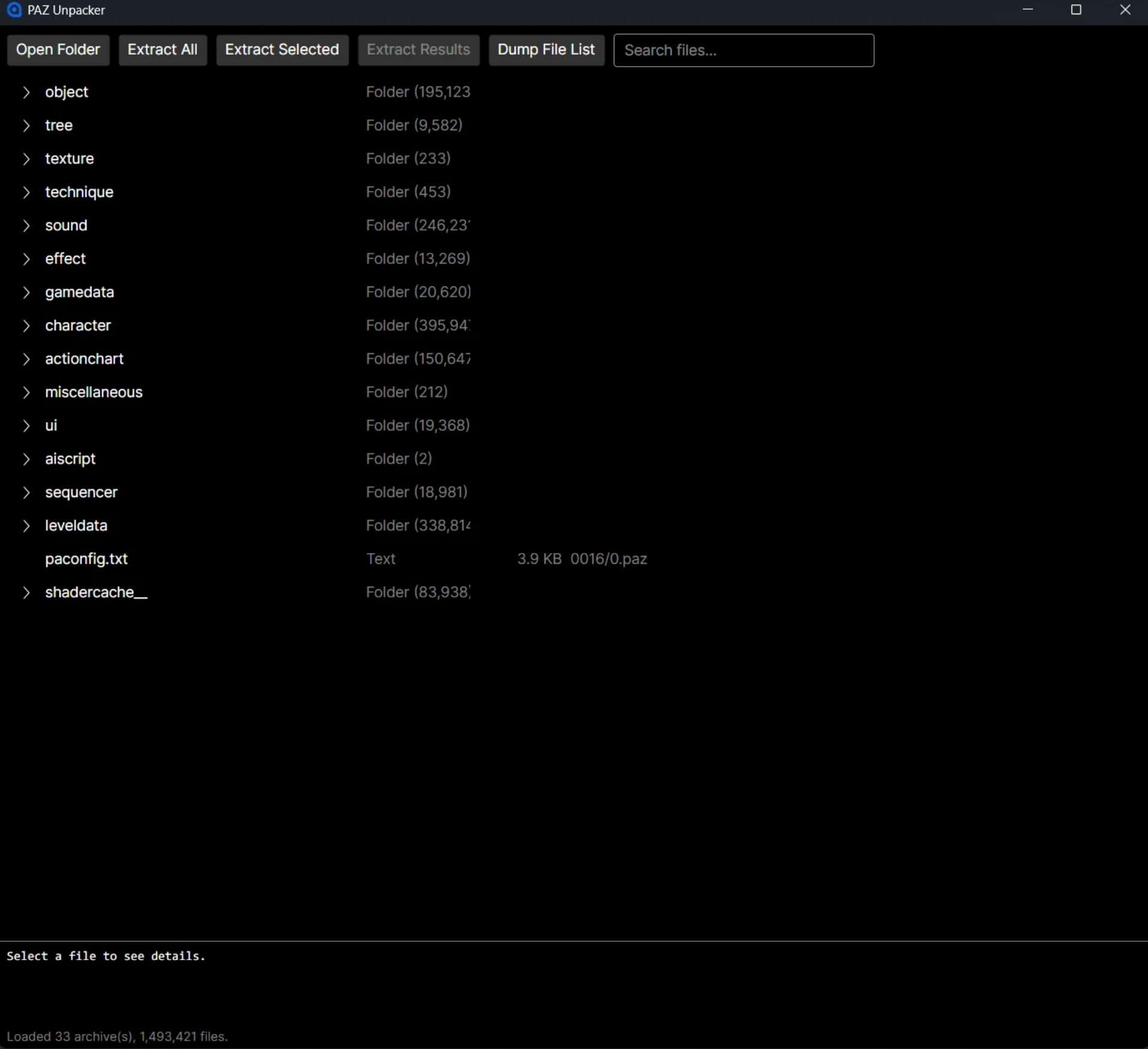
C# GUI to read, unpack, and extract the games paz files. Python scripts with samples for decrypting, decompressing, and repacking. Tools for browsing, extracting, decrypting, and decompressing .paz archive files used by Crimson Desert.
Features
– Browse PAMT archives with a visual file tree
– Batch extract files with automatic decryption and decompression
– ChaCha20 decryption with automatic key derivation from filename
– LZ4 decompression for compressed entries
– Python CLI tools for unpacking and repacking
– No external dependencies — all crypto and compression built in
Downloads
– PAZ GUI — Windows desktop app for browsing and extracting PAZ archives. Requires .NET 8 runtime.
– PAZ Python Tools — Standalone CLI scripts for unpacking and repacking. Requires Python 3 with cryptography and lz4 packages.
GUI Usage
– Download and extract the GUI zip
– Run PazGui.exe
– Open a folder containing .paz archives to browse the archive
– Select files and extract — decryption and decompression are handled automatically
Python CLI Usage
# List archive contents
python paz_parse.py /path/to/0.pamt –paz-dir /path/to/0003
# Extract all files
python paz_unpack.py /path/to/0.pamt –paz-dir /path/to/0003 -o output/
# Extract only XML files
python paz_unpack.py /path/to/0.pamt –paz-dir /path/to/0003 -o output/ –filter “*.xml”
# Repack a modified file
python paz_repack.py modified.xml –pamt /path/to/0.pamt –paz-dir /path/to/0003 –entry “path/to/file.xml”
How It Works
PAZ archives use PAMT index files that map file paths to byte ranges within one or more .paz data files. Encrypted entries (XML configs) use ChaCha20 with keys derived deterministically from the filename — no key database needed. Compressed entries use LZ4 block compression.
Modding Limitations
Repacking is currently highly unreliable due to the game’s integrity checks on metadata files (or similar errors). Modified files must fit within the original file’s allocated size — there is no way to expand entries yet. Meshes and many other game objects use custom binary formats that are not yet fully documented.
Source Code
Source is available on https://github.com/lazorr410/crimson-desert-unpacker. The project is MIT licensed.