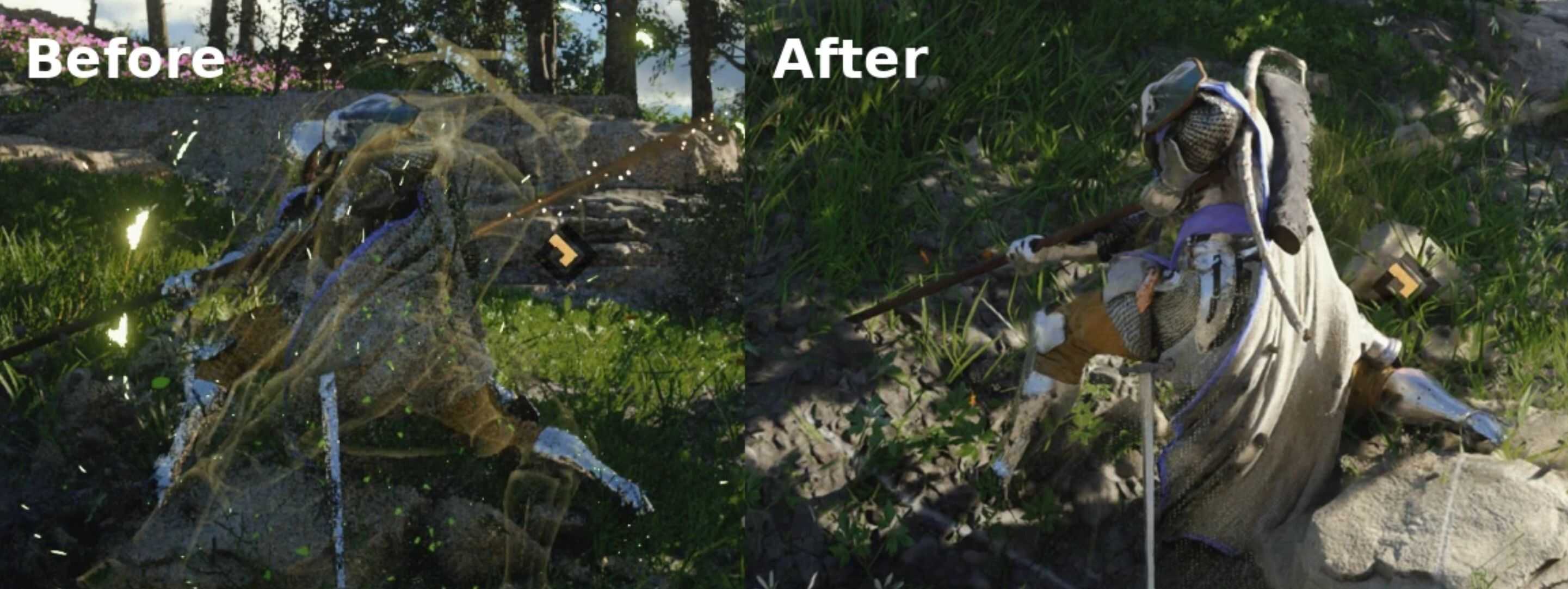
Found the graphics become super noisy and messy when spaming heavy attack (especially with RR on)? Let me fix it. Works both for Kliff and Damiane.
This mod fix the noise glitch when spaming heavy attack with Ray Reconstruction (RR) on. You definitely notice a noisy and messy graphics after you unlock Nature’s Echo and performing heavy attack. This visual glitch is possibly caused by the wrong position in the rendering pipeline of its post effect, which means RR’s denoiser doesn’t cooperate well with post effect of Nature’s Echo. This mod removes such noise by disabling a part of its shader using shaderToggler.
Installation instructions
– Extract and throw all the files in the zip to game install folder.
– Install Reshade with Full Addon Support: https://reshade.me/#download.
Then you are all set. The effect is toggled at the startup. If you want to disable it, just press page down. If you wish to change the hotkey, open reshade GUI (default is home) and go to Adds-on tab, click edit.